TLDR : For small business owners curious about what AI can do for their operations, and for developers building those automations. This post argues that AI’s biggest opportunity for small businesses isn’t guidance from chat bots, it’s unifying data across all the tools a business already uses so quicken the feedback loop within the company.
It walks through a real example: building an MCP Connector that pulls bank transactions from Gmail, stores them in SQLite, and lets an owner ask Claude “which clients haven’t paid me this month?” and trigger reminder emails in one conversation.
The Problem with Systems of Record
Systems of Record - Salesforce, Monday.com, Zoho, Odoo, ERPNext, Hubspot, Quickbooks, Tally, Khatabook, Pipedrive - the list goes on. There are dozens of SaaS platforms that aim to serve businesses with software for nearly every function: accounting, payroll, invoicing, CRM, marketing, HR, inventory management and more.
They’re called systems of record for a reason. They record, they don’t really advise. Rule-based logic has always been inadequate for true business intelligence. Getting multiple modules within a single platform to speak to each other has always been challenging, let alone across different platforms. With the coming of AI, each of them is racing towards its integration. The promise: intelligence that truly knows every corner of your business and can give you meaningful insights , beyond simple queries like “account balance”, “click-through rate”, or “payroll status”.
It’s certainly possible that any one of these companies can go further with AI than they ever have before.
Their fundamental limitation, though, has always been adoption - internally within companies and especially by contractors, partners and clients.
No single software works for everyone. Power users of SaaS end up trying to fill the gap left by others and fail miserably.
The Vision: A Unified Business OS
A different future that AI could enable is the unification of business data across multiple tools. Perhaps in the future it doesn’t matter that one sales agent uses Zoho to record conversions and another simply does so over WhatsApp. A single Business OS could unify and semantically organise critical data across multiple platforms, making the true state of a business, and the reasons behind it, much more visible.
But plentiful data is only one part of the puzzle. AI also promises to guide, and in some cases iteratively optimise, business functions on loop. Digital marketing is a prime example: AI can change a business’ marketing content - copy, thumbnails, titles - on autopilot given a metric to optimise like click-through rate. For higher-level functions, AI can act as a brainstorming partner, guiding employees wherever human execution remains necessary. Indeed if one were to skim the majority of job postings that use the word AI, it is businesses seeking to do exactly this.
It remains to be seen what form this Business OS will take. We’re seeing parts of it take shape. Zapier was a pre-AI precursor of this unmet requirement. n8n, make.com, OpenAI’s Codex for Work, Glean are all early forms of this. Many companies are also building their own custom harnesses , bypassing tools entirely and directly connecting different business verticals via API.
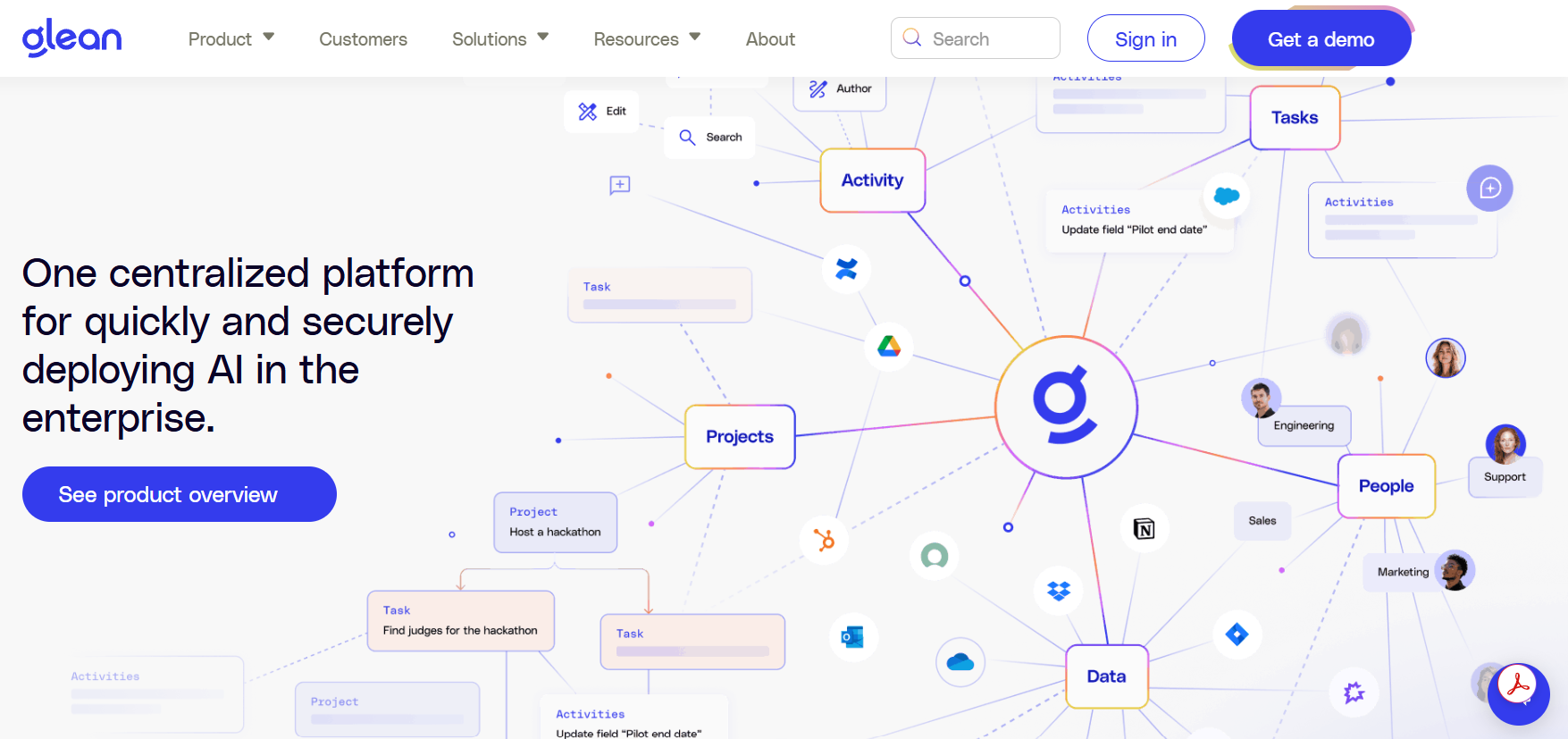
Glean's vision of a unified Business OS
In this series of posts we’ll take a look at what this looks like practically.
Use Case 1 - Chasing Client Payments
The first use case imagines a small business owner (a frequent Claude user) who wants visibility into his company’s payments - specifically, which clients have paid and which haven’t. Typically, getting that answer means logging into business email and checking himself, or asking an employee to do it. He also wants to understand overall cash flow and how tight next month is likely to be.
One of his staff, exploring automations, builds him a Claude Connector for exactly this. The Connector, at a fixed daily frequency, checks his email for new transactions from the company’s bank and stores them in a SQLite database locally. He can then simply ask via chat:
Owner: Which clients are yet to pay me this month?
Claude: (returns the list)
Claude: Want me to send them reminders?
Owner: Yes.
Claude drafts emails in the company’s professional tone , without the owner having to think about it. Small, yet undeniable value.
How It Was Built
The State of Bank Statements
In India, financial data , bank transactions in particular - aren’t easily accessible outside of the bank’s own apps. Third-party access is possible through Financial Information Users (FIUs): RBI-regulated companies allowed to provide financial services using the customer’s bank data under the Account Aggregator (AA) Framework. The way it works is, you login to an FIU built Mobile App, for e.g. PhonePe. Then make a request asking it to fetch your bank transactions. The App sends a request typically to SETU, the biggest data sharing infrastructure provider in India. SETU receives the request accesses your bank data and returns it to the App which displays it.
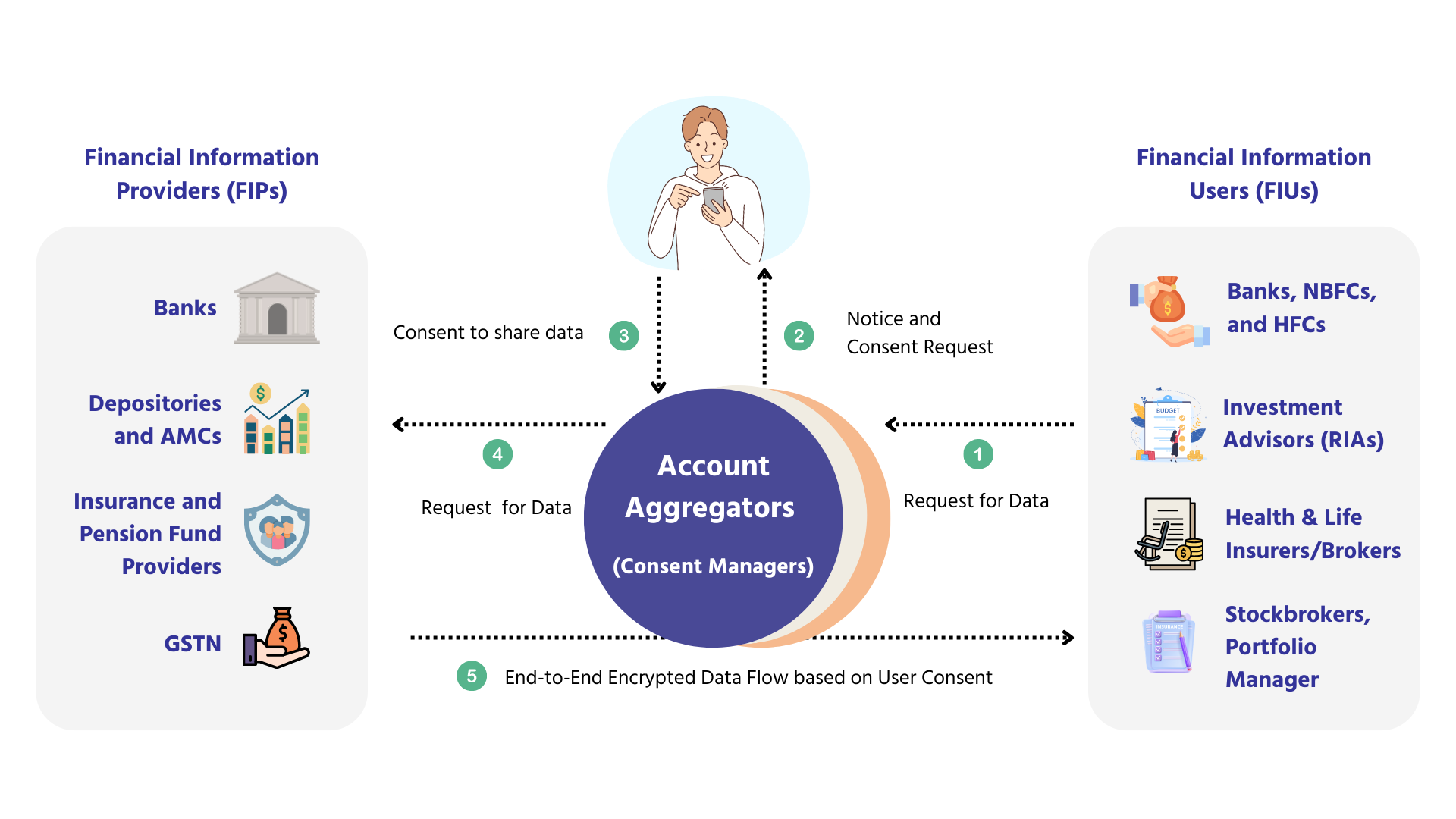
The Account Aggregator Framework in India (Source: Sahamati)
While this system has worked well so far, choosing an FIU limits you to what that FIU’s app does. In this case, FinTech Apps (FIUs) that exist only provide transactions and balances, and some interactive visualizations of your spending. They do not do payment recovery or reminder emails.
This is the curse of domain specific SaaS. All of the agentic workflows possible with AI agents aren’t possible with Fintech Apps.
So the company decides to build an AI integration themselves. They themselves aren’t an FIU. Getting registered as an FIU is a process that takes multiple months and lakhs of rupees. They need an easier way to fetch their banking data. The next best alternative is to fetch bank statements and transaction emails from Gmail. How does one do that?
The answer is Connectors. When you want Claude to have trustworthy, reliable access to data from an external source, you use or build a Connector. Claude and other AI Apps facilitate MCP Connectors. The company then uses Claude to build an MCP Connector that periodically extracts bank statement PDFs from Gmail, parses them into a structured format, and stores transactions in a local SQLite database ready for querying.
The company has two accounts - SBI and Axis, and both statement PDFs have completely different layouts. No standard schema seems to exist that the RBI has enforced for transaction field formats. The transaction row formats of different banks still share some consistencies, encoding of the mode of payment, transaction type, transaction ID, payee name, payee bank and other fields into a single reference string looks like this.
UPI/P2M/952596061064/GoogleCl/AXIS BANK/MandateE//P2V/.
Two different parsers handle the extraction, but once the standardised string is decoded, the data lands in the same schema regardless of which bank it came from.
Challenge 1: Getting Statement PDF Attachments Out of Gmail
Getting the PDFs out of Gmail turned out to be the first real surprise. Claude Desktop already has Anthropic’s Gmail Connector - it can search threads, read emails, find attachments. The natural assumption is that this covers everything. It doesn’t.
When you call the get_thread tool, the Gmail Connector returns the email contents and an attachment_id but not the statement PDF itself.
Attachment data above a few KB requires a completely separate API call -
messages.attachments.get- and that call needs its own credentials. The custom Bank Connector must make that call directly, which means it needs its own Gmail authentication.
The Gmail Connector’s OAuth token lives inside Anthropic’s process, and no third-party MCP Connector can touch it, by design. So the Bank Connector handles all Gmail operations independently, searching for statement emails, fetching message metadata, and downloading PDF bytes, using its own token.
The fix is a one-time setup script bundled with the connector. Running python setup.py opens a browser, prompts the user to approve Gmail read-only access, and saves a token.json locally. No Google Cloud project, no credentials file to download - the OAuth client credentials are embedded in the connector itself.
The user ends up granting Gmail read access twice: once for Anthropic’s Connector when setting up Claude Desktop, and once for the custom Bank Connector. Two tokens, two processes, both calling Gmail independently.
What’s worth noting: Claude itself never handles either token. Credentials stay inside each process. That’s not a limitation of the architecture, it’s exactly the right security boundary.
Challenge 2: Orchestrating a Multi-Step Workflow
The second challenge was orchestration. Claude sees every tool from every connected MCP as a flat list. Nothing in that list tells it “which clients haven’t paid me this month?” - that requires searching Gmail first, then downloading PDFs, then parsing them, then querying the database, in a specific order. That knowledge has to live somewhere Claude can read before the user asks anything.
The mechanism is server-level instructions - the MCP SDK lets you pass a block of text when initialising the server, and Claude receives it at session start before the first message is sent. These instructions define two distinct paths depending on the user’s state:
- First-time setup: call
preview_syncfirst, a fast Gmail search (no downloads) that returns how many new statements exist per bank and an estimated sync time. Claude presents this to the user and asks which banks to start with. Then callsync_statementswith those banks. If the response includesremaining > 0, keep calling it in batches until done. - Ongoing use: just call
sync_statementswith no arguments - it picks up only new statements since the last sync.
This approach encapsulates the multi-step logic inside purpose-built tools rather than leaving Claude to choreograph raw API calls in sequence. preview_sync exists entirely to set expectations before any downloading starts - on a first run with a year’s worth of statements across three banks, kicking off a blind sync and waiting could take several minutes with no feedback. Showing counts and time estimates upfront lets the user make an informed choice about what to sync first.
The subtler problem: Claude Desktop times out tool calls at roughly 60 seconds. SBI savings PDFs take ~8 seconds each to parse. A naive “sync everything” call on a fresh install would hit that limit long before finishing. Batching to five statements per call, with Claude looping on the
remainingcounter, keeps every individual tool call well within the timeout.
Server instructions prime Claude at startup. The tool descriptions reinforce the workflow mid-conversation, long after session context may have shifted. You need both.
Challenge 3 - Latency
If the sync workflow ran every time the user asked a question, response time would be on the order of 30s or more per query. Too long for anything conversational. The solution is to decouple sync from query.
Once statements are parsed and stored in SQLite, all queries run against the local database - no Gmail, no PDF parsing, just a SQL query. Response time drops to 2-5 seconds.
Sync runs separately, on demand. The user says “sync my statements” roughly once a month, Claude picks up only new PDFs since the last run and adds them to the database. Everything already synced is skipped. From that point until the next sync, all queries are instant.
A natural next step is automating the monthly sync on a schedule - Windows Task Scheduler or a cron job - so the database stays current without the user having to think about it. That isn’t wired up in the current version, but the sync function is designed to be called that way: it’s stateless, idempotent, and returns a structured summary that can be logged.
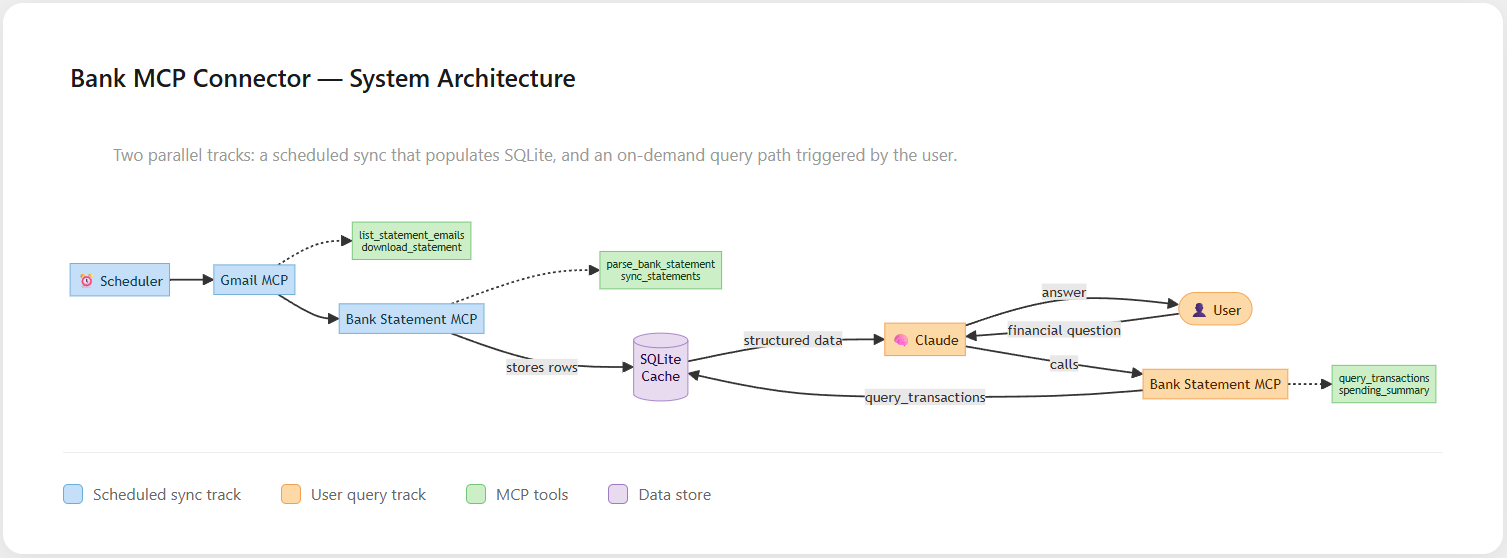
Architecture of the Bank Connector MCP
Like and follow to see more posts in this series on Business Automations with AI.